Billing cycles and key dates
Overview
When exactly is an invoice created, when is it due, and when is it considered overdue? This article explains the billing timeline – from the subscription's billing date to overdue status – shows with a worked example how a fixed billing date affects the first invoice, and explains what happens to that date after a plan change or a pause.
When invoices are created
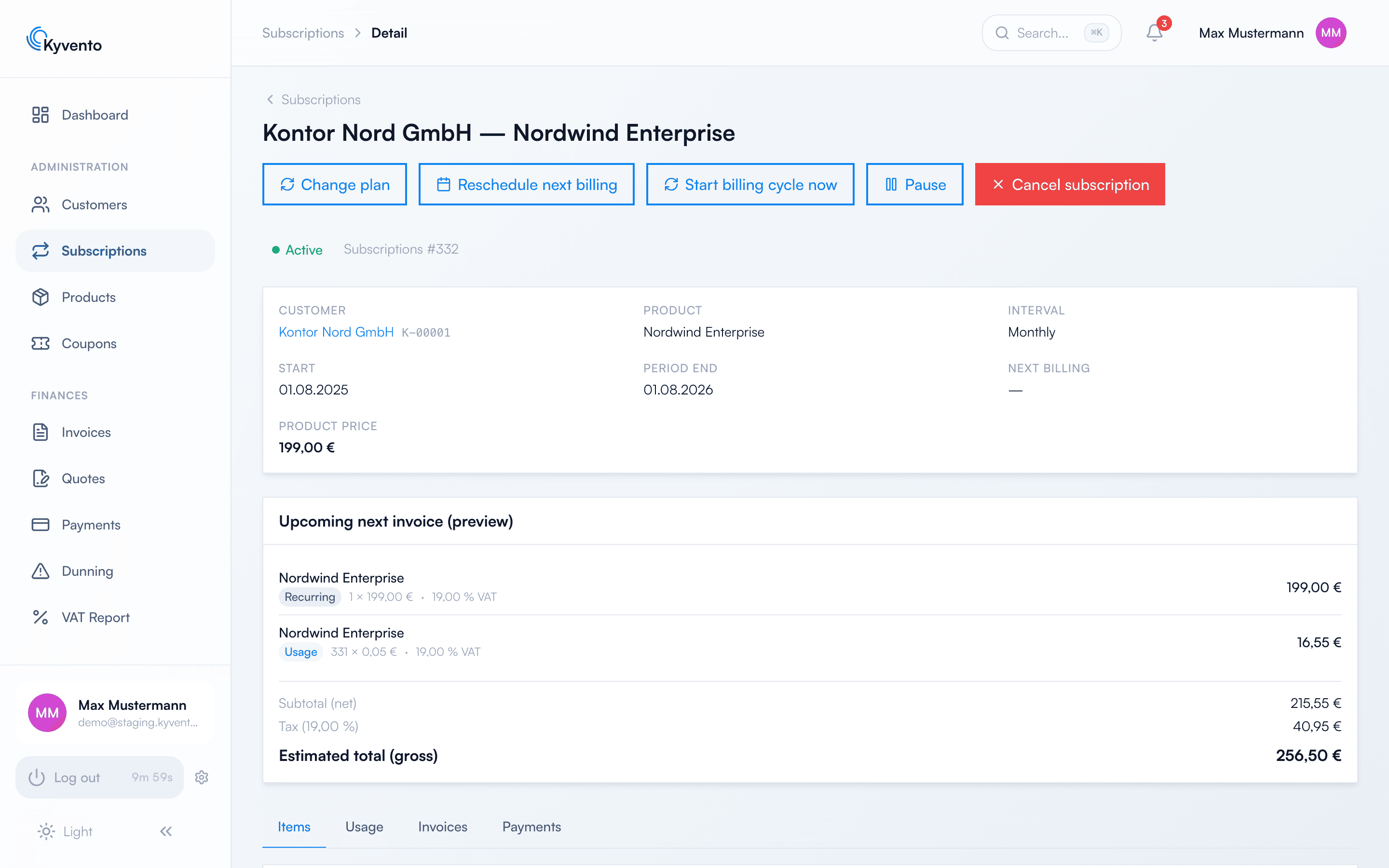
Every subscription has a next billing date (visible on the subscription detail page under "Next Billing"). An hourly billing run processes the billing dates that have come due and automatically creates the next invoice – including open usage and any active discounts. The run does not check your entire portfolio; it works through the billing runs scheduled for that point in time. A due billing date is therefore processed within the following hour, not to the minute.
The rhythm is set on the product via "Billing Interval" and "Interval Count" – the position of the billing date is set by the billing anchor.
The billing anchor: a fixed date instead of the booking date
On the product, "Billing Anchor" defines the day on which every billing period starts:
- "From subscription start" (default) – the billing date follows the booking date: booked on the 12th means billing on the 12th each time.
- "Start of month" – every period starts on the 1st of the month.
- "Start of year" – every period starts on January 1st.
- "Fixed calendar day" – every period starts on the day you enter in the "Billing day" field (1 to 31). This puts all customers of a product on the 15th, for example. A day a month does not have falls back to the last day of that month: the 31st becomes the 28th (or 29th) in February and the 30th in April – the period does not slip into the next month, and in the months after that it is the 31st again.
Only anchors that match the billing interval can be selected: "Start of month" and "Fixed calendar day" from monthly billing upwards, "Start of year" only from yearly billing. With daily or weekly billing, "From subscription start" is the only option. What counts is the unit of the interval, not the interval count – "daily" with a count of 30 is still a daily interval. The product form hides combinations that do not fit; if you change the interval, an anchor that no longer fits falls back to "From subscription start". Via the API, unsuitable combinations are rejected.
For an individual subscription – for instance a migrated contract with an established billing day – you can pass a custom billing day when creating it via the API (field billing_anchor_day, 1 to 31). It then applies instead of the product anchor – even if the product itself uses "Start of month" or "Start of year" –, survives a pause and a reactivation after suspension, and is returned in the subscription's API response. It cannot be combined with a trial: the billing date only comes into existence at the transition to the paid run-time and is then calculated from the product anchor. In that case, create the subscription without a trial or move the billing date manually after the conversion (see below).
The billing date applies in your account's time zone, not in UTC – so a subscription renews on the day you see in your calendar. With an anchor date, the period end always falls on 0:00 of that day, regardless of the time of the booking.
The first period is a partial period
If a customer books between two billing dates, the first period runs only until the next billing date and is charged pro rata by the day – not at the full price. From the second period onwards, everything runs regularly from billing date to billing date.
An example with a product at €30.00 per month, anchor "Start of month", booked on 17 March:
- First period: 17 March to 1 April = 15 days. The comparison is a full month from the booking date (17 March to 17 April = 31 days) – so the charge is €30.00 × 15/31 = €14.52.
- Second period: 1 April to 1 May = €30.00, and so on from the 1st to the 1st.
"Fixed calendar day" works the same way, just with your day as the billing date: the same product with billing day 15, booked on 5 March, has a first period of 5 March to 15 March = 10 of 31 days, i.e. €9.68; after that it runs from the 15th to the 15th. A booking on 25 March runs until 15 April first (21 of 31 days).
The same rule applies to longer intervals – first until the next billing date, then full intervals from there. A quarterly subscription with "Start of month", booked on 17 March, has the periods 17 March to 1 April (15 of 92 days, pro rata), then 1 April to 1 July, 1 July to 1 October and so on. A yearly subscription with "Start of year", booked on 15 June, runs until 1 January first (200 of 365 days) and then from 1 January to 1 January.
If the booking day falls on the billing date itself, no partial period is created – a full period is charged, regardless of the time of day. For "Start of month" and "Start of year" this holds when the interval is exactly one month or one year respectively. With longer intervals, the first period still ends on the next billing date: a quarterly subscription with "Start of month", booked on 1 April, runs until 1 May first (30 of 91 days, pro rata) and then from 1 May to 1 August. With "Fixed calendar day", a booking on the billing day is always a full period, even for quarterly or yearly billing.
Two things are unaffected by the reduction: setup fees and other one-off items are never reduced, and neither are usage-based items. For a subscription with a trial, the end of the trial counts as the booking day: if it ends on 20 March, the first paid period runs from 20 March to 1 April (12 of 31 days, €11.61 in the example).
If you do not want partial periods, enable "No pro-rated first period for calendar-anchored products" under Settings → Account in the "Invoicing" card. If the first period would otherwise be pro-rated, it runs until the anchor after next instead and is charged at the full price: the example above would run from 17 March to 1 May for €30.00. The switch applies to checkout, API creation and the end of a trial – not to a plan change and not to a reactivation after suspension; nothing is charged pro rata there, and that is deliberately kept the same. If the booking day falls on the billing date, the switch changes nothing, provided the first period is a full one anyway; with longer intervals and "Start of month" or "Start of year", it extends that period too, up to the anchor after next – the quarterly example above, booked on 1 April, would then run until 1 August at the full quarterly price.
The customer sees the pro-rata amount before purchase: the order review in the checkout shows the first amount, a note stating how many days up to which billing date the first invoice covers, and the full amount that applies from the second period onwards. With a trial, the review already calculates from the end of the trial. On the invoice, the service period shown matches the subscription period exactly.
Billing anchor and a fixed number of repetitions
If you limit the run-time via "Repetitions", that field counts billing runs – not full months. The partial period is one of them. For the example above with 12 repetitions, that means:
- 12 invoices: one pro-rata invoice of €14.52 and eleven full ones of €30.00 each
- Total: €344.52 instead of the expected €360.00
- End of run-time: 1 March instead of 17 March
The calculation is correct – the customer pays for exactly the time they get (around 350 days instead of 365). It is still surprising, which is why the product form points it out as soon as a billing anchor and a fixed number of repetitions are combined. If you need to guarantee a particular run-time, factor the partial period in.
For a subscription with a trial, the same number applies: twelve repetitions produce twelve invoices – here the first one after the trial ends, plus eleven more.
Plan changes, pauses and rescheduling
The billing date is also kept when a subscription is changed along the way:
- After a plan change, the anchor of the new product applies – exactly as for a new booking. When upgrading to a more expensive plan, the first period of the new plan ends on the next billing date and is charged pro rata on the plan-change invoice; the preview names the same amount. The first renewal after that is a full interval at the full price again. When downgrading to a cheaper plan, which takes effect at the end of the period, the new period starts at the old period end, ends on the next billing date and is charged pro rata.
- After a pause, the current period shifts by the length of the pause – the customer does not lose a paid day. With every calendar anchor – "Start of month", "Start of year", "Fixed calendar day" and a billing day agreed via the API – the billing date stays put: the following period ends on the billing date again and is charged pro rata, after which the subscription continues regularly. Example at €30.00 per month: the period 1 March to 1 April is paused on 10 March for twelve days and therefore ends on 13 April; the transitional period 13 April to 1 May covers 18 of 30 days and costs €18.00; from 1 May onwards, the full amount is charged again. If the pause ends exactly on the billing date, there is no transitional period. Only with "From subscription start" without a custom billing day does the billing day move with the shifted period end. Details on pausing: Pausing or freezing subscriptions.
- After a reactivation (lifting a suspension, for instance after a payment failure or a won chargeback), a new period starts on the day of reactivation. With a calendar anchor it ends on the next billing date – so the billing date is kept, including a billing day agreed via the API. This transitional period up to the billing date is not charged; the first invoice after reactivation is the renewal on the billing date for a full period. Start and end of the uncharged transitional period are recorded in the internal audit trail – not visible within the account itself, but traceable in a support case and included in the account data export. With "From subscription start" without a custom billing day, a full interval starts from the reactivation day instead, which becomes the new billing day.
Due date: the payment term
An invoice's due date is derived from the payment term in days – Kyvento uses the most specific setting available:
- A payment term set explicitly on the invoice
- the field "Payment Terms (days)" on the customer (in the form for creating or editing them)
- the account-wide "Default payment terms (days)" under Settings → Account
- the system default of 14 days
Exception: invoices with credit offsetting are due immediately
When customer credit is offset against an invoice as it is created, that invoice carries no payment term — it is due immediately. This is not a fault but a legal necessity: offsetting is a set-off and requires a due claim (§ 387 BGB). With a payment term, the claim would not be due on the invoice date and the set-off would therefore be ineffective.
What counts is the intent, not the outcome: the invoice becomes due immediately if the settings permit offsetting and the customer holds credit in the document's currency. If the offsetting finds nothing in the end, the invoice gets its regular payment term back.
On the e-invoice, credit offset this way does not appear as a prepayment — it was not one — but as a readable note; the amount payable shows the full gross total.
Overdue status
A daily check run at 1 a.m. sets invoices to "Overdue" once the payment term has elapsed. It covers invoices with the status "Open"; partially paid invoices keep their status. From "Overdue" onwards – if enabled – payment reminders and the dunning process take effect.
Adjusting billing dates in individual cases
On the subscription detail page, you can move the next billing date via "Reschedule next billing". The new day applies permanently: the subscription adopts it as its billing day, and all following periods follow it – this is how you align all of a customer's subscriptions to the same day. A date in the past triggers an invoice immediately on the next billing run. With a calendar anchor, the chosen date applies at 00:00 in your account's time zone – just like every automatically calculated period, and all following periods keep that time; with "From subscription start" it applies at 00:00 UTC. Via the API (next_billing_date), the date is accepted strictly as YYYY-MM-DD; a time or time-zone part is rejected. With "Start billing cycle now" you trigger the next billing immediately instead.
Next steps
- What happens if a payment doesn't come in – see Payment terms and due dates and Enabling automated dunning
- Control the renewal behavior – see Configuring automatic renewal
- Set up trials – see Setting up trials and trial subscriptions