Collecting SEPA direct debits through your own bank
Overview
With own-bank collection you collect SEPA direct debits through your own bank instead of a payment service provider. Kyvento creates the direct debit file for a collection date, you submit it to your bank and afterwards tell Kyvento what the bank has posted. This article describes the route from the prerequisites to the feedback. The standard route via Stripe or Unzer and the comparison of both routes are covered in Setting up SEPA direct debit.
When own-bank collection is the right route
Own-bank collection requires two things Kyvento cannot obtain for you:
- Your own creditor identifier. In Germany you apply for it free of charge at the Deutsche Bundesbank. Your payment service provider's identifier is not yours — with own-bank collection you are the creditor yourself.
- A direct debit agreement with your bank that entitles you to submit direct debits.
If either is missing, collection via the payment service provider is the right route. Own-bank collection also only works for claims in euros.
What Kyvento does — and what it does not
The roles are clearly separated, and you should know that before switching:
- Kyvento creates the direct debit file, sends the pre-notification to your customers and posts credits and returns as soon as you report them.
- You obtain and retain the mandates, submit the file to your bank and upload the bank statement. The validity of a mandate is your responsibility; Kyvento only checks the form of your entries.
Kyvento has no access to your bank. There is no automatic reconciliation. Kyvento cannot recall a direct debit once it has been submitted to your bank — for that, contact your bank.
Step 1: switching the collection route
In the payment settings, in the section for SEPA through your own bank, select the option "Through my own bank" and enter your creditor identifier and the collection account — either the bank details from your account data or a different account. Without both, the route cannot be switched.
The switch affects SEPA only; card payments and PayPal keep running through your payment service provider unchanged. Two consequences matter:
- In the checkout and the customer portal, SEPA direct debit is no longer offered. New customers can no longer grant a mandate there; you record the mandates yourself (step 2).
- The pre-notification lead time from the same payment settings also applies to own-bank collection. It helps determine how early a collection date can be at the earliest.
Step 2: recording mandates
You record mandates for own-bank collection via the API — individually per customer or as a CSV file. There is no input form for this in the interface; how to make API calls is explained in API documentation and examples.
The columns of the mandate file:
| Column | Required | Meaning |
|---|---|---|
customer_number | yes | Customer number in Kyvento |
mandate_reference | yes | Mandate reference, unique per account |
iban | yes | The customer's IBAN |
mandate_date | yes | Date the mandate was granted, not in the future |
bic | no | The customer's BIC |
one_off | no | One-off mandate instead of a recurring mandate |
Semicolon and comma both work as separators. A recorded mandate is ready for use immediately; existing mandates from earlier years are the normal case. Three rules matter day to day:
- The mandate reference is immutable — a new reference is a new mandate. If a customer changes bank account, record the same reference with the new IBAN; the next direct debit then carries the mandate amendment marker your bank expects.
- Retired instead of deleted: a revoked mandate stays stored so that a late return can still be matched.
- Kyvento generates no mandate text for own-bank collection. You use your own mandate form and retain it yourself.
Step 3: choosing the collection date, creating the file, submitting it
The SEPA collection area under "Finances" guides you in a fixed order: choose the collection date, check the preview, create the file.
- The collection date has to be a banking day and lie at least two banking days in the future — the file still has to be uploaded and accepted by your bank.
- The preview shows which claims are included — and, if there are exclusions, below that which are not, each with its reason. A claim is only included if it has been announced to the customer for exactly this collection date and the outstanding amount matches the announced one — dunning fees included. If a collection is already in progress, the claim waits.
- There is no individual selection: the file always contains all collectable claims of the chosen day. If you want to leave a claim out, the reason has to lie in the claim itself.
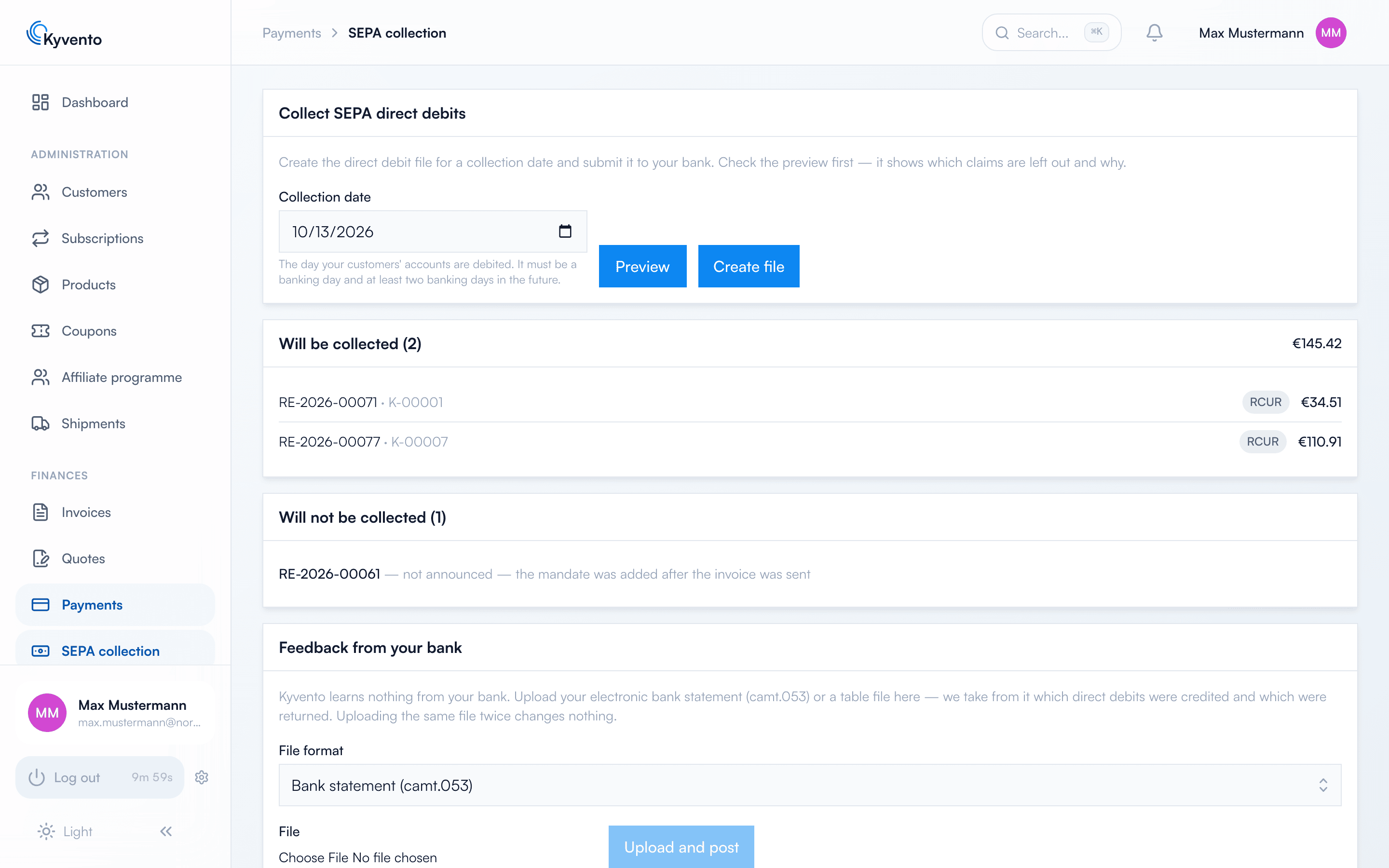
"Create file" creates the collection run. It appears in the list of created files with collection date, count and total; you download the file and submit it in your bank's online banking. After that:
- The affected invoices remain open; each invoice now has a payment in progress. While it is running, dunning is paused for that invoice.
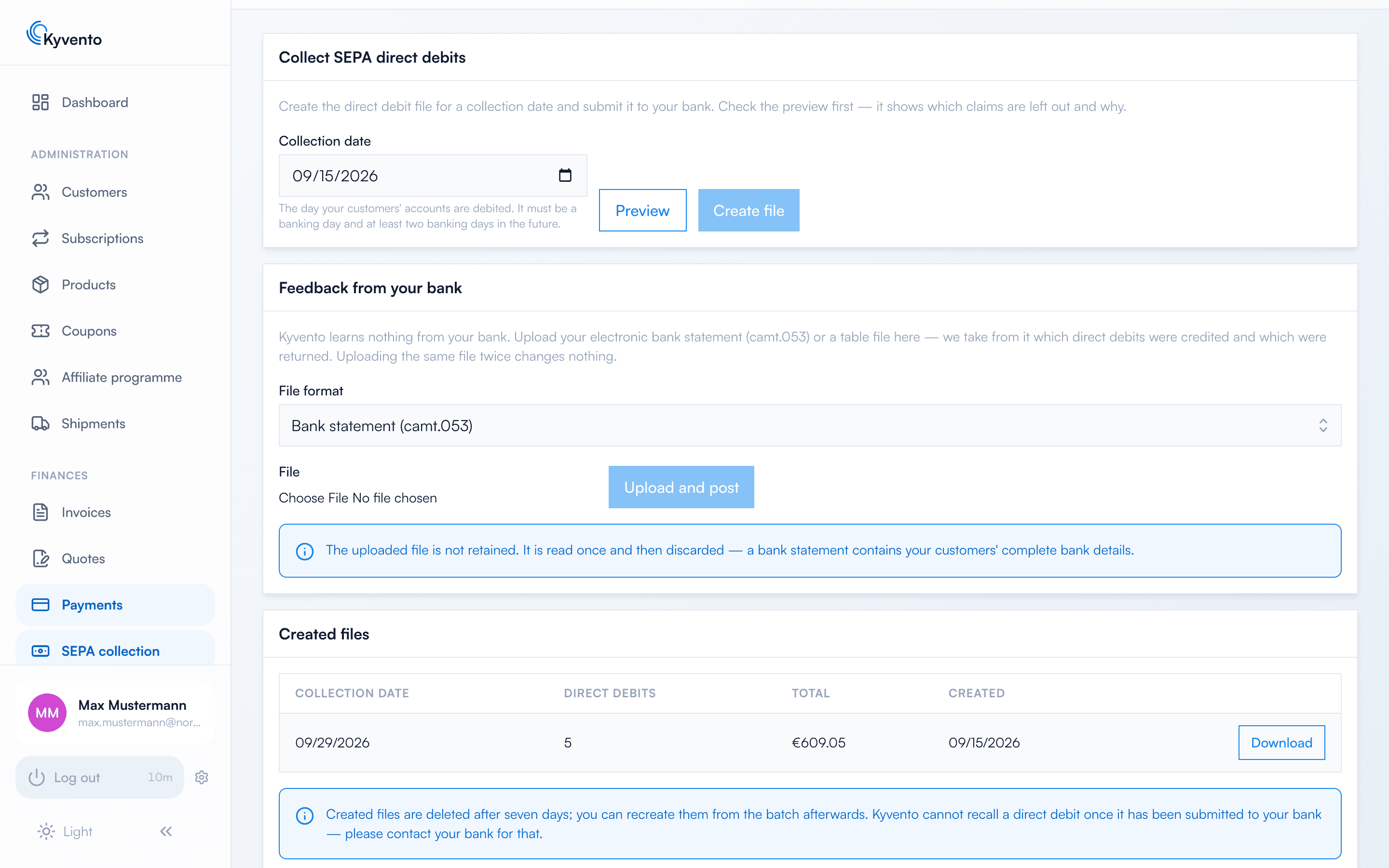
- The file is deleted after seven days. It can be recreated from the run afterwards — unless a mandate involved has changed in the meantime; then Kyvento refuses, because the file would no longer match.
- You cannot cancel a run. Whatever has been submitted to the bank is settled with the bank.
Step 4: uploading your bank's feedback
Kyvento learns nothing from your bank. Whether a direct debit was credited or returned is something you tell Kyvento in the section for the feedback from your bank — as an electronic bank statement (camt.053) or as a table file (CSV), with "Upload and post". Matching happens via the reference from the direct debit file, for instance RE-2026-00042-1. In the bank statement, Kyvento skips postings that do not concern any of your direct debits; in the table file, an unknown reference is an error of that row. Uploading the same file twice changes nothing.
The columns of the table file:
| Column | Required | Meaning |
|---|---|---|
reference | yes | Reference from the direct debit file |
status | yes | settled (credit) or returned (return) |
booking_date | yes | Your bank's booking date, YYYY-MM-DD — never leave it empty, otherwise Kyvento posts with the day of the upload |
reason_code | no | Your bank's return reason for a return, such as AM04 |
What the feedback triggers:
- Credit: the payment counts as successful and the invoice as paid — with your bank's booking date as the payment date, not the day of the upload. That keeps your bookkeeping in the right month.
- Return without a prior credit — the normal case, insufficient funds for instance: the payment counts as failed, the invoice stays open and dunning continues. On the next collection attempt the invoice receives a new reference with an incremented suffix.
- Return after a credit — the refund a customer can demand within eight weeks: Kyvento posts a chargeback, reopens the invoice and starts the separate dunning levels for chargebacks.
A return does not block the mandate. The uploaded file is not retained — a bank statement contains your customers' complete bank details.
Why the feedback is not optional
Without feedback, every submitted direct debit stays in limbo for Kyvento: the invoice is neither paid nor dunnable. So that this does not go unnoticed, a fixed sequence applies, counted from the collection date:
- After 14 days you receive a notification in the app that the feedback is missing.
- After 30 days Kyvento lifts the dunning hold. The claim is dunned again, with the fee of the dunning level reached — even if the money arrived long ago and only the feedback is missing.
- Kyvento never marks an invoice as paid on its own and does not collect it a second time while the old collection is still open.
Moving back to the payment service provider
If you later want to collect via Stripe or Unzer again, first select the transitional state for moving back to the payment service provider. Checkout and portal then offer SEPA via the provider again, while existing own-bank mandates keep running through the file. You can only switch for good once no usable own-bank mandate exists any more — that is what "Retire all own-bank mandates" is for.
Next steps
- Both SEPA routes compared — see Setting up SEPA direct debit
- Dunning levels and fees for chargebacks — see Customizing dunning levels and texts
- Recording mandates via the API — see API documentation and examples