Duplicating plans and using templates
Overview
Similar plans – a yearly variant of an existing monthly plan or a promotional price, for example – don't need to be configured from scratch. With the duplicate function, you create a complete copy in seconds and only adjust the differences.
Duplicating a product
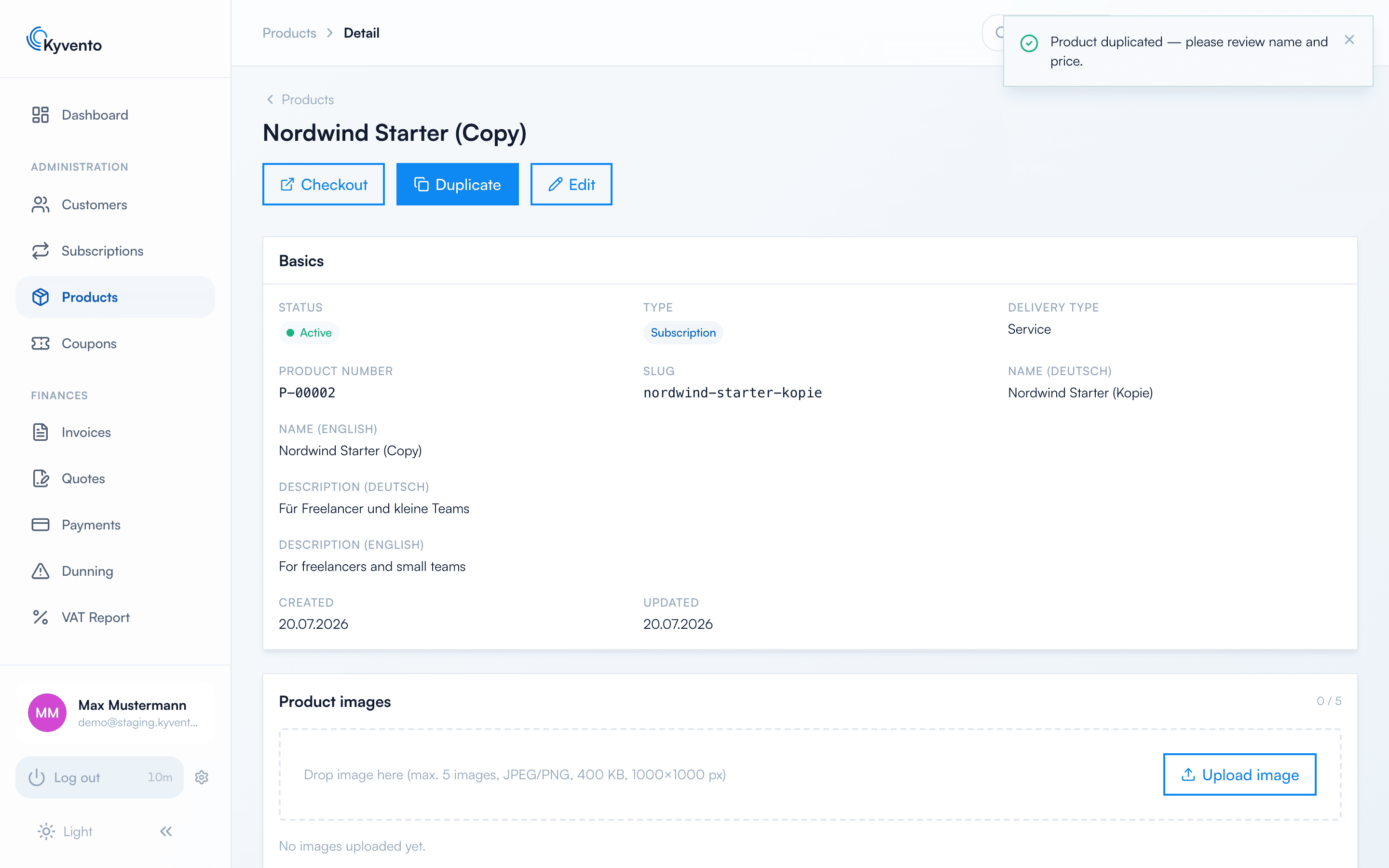
Open the product's detail page ("Management" → "Products" → click the product) and choose "Duplicate" in the action bar. Kyvento copies every setting — texts, prices, intervals, cancellation conditions and tax configuration —, assigns a new product number and slug, and appends "(copy)" to the name. You land directly on the copy's detail page.
Two things are worth knowing:
- The copy is active immediately — bookable without any further action. Adjust the name and price before you link to or advertise the new plan.
- Product images are deliberately not copied. Upload them again in the copy if you need them.
For automation, the same operation is available as the API endpoint POST /api/v1/products/{id}/duplicate.
Recommendations for plan families
- Keep the monthly and yearly variants as separate products – this keeps prices, notice periods and analytics cleanly distinguishable.
- Don't overwrite old price levels: archive the old plan (existing subscriptions continue, but it can no longer be newly booked) and sell the new variant in parallel.
Next steps
- Product form basics – see Creating a plan: step by step
- Retire old plans in an orderly way – see Archiving cancelled subscriptions