E-invoicing: XRechnung and ZUGFeRD
Overview
Since 2025, e-invoicing has been becoming mandatory step by step in German B2B business. Kyvento produces e-invoices to the European standard EN 16931. This article explains what already happens without your involvement, what you have to configure and how to generate a single e-invoice.
The formats in one sentence each
- ZUGFeRD – an ordinary readable PDF with the invoice data embedded as XML. Humans read the PDF, software reads the XML. The normal case in business.
- XRechnung – a pure XML file, required above all by public-sector customers. Stricter mandatory details apply here.
- Factur-X – the French counterpart to ZUGFeRD, technically closely related.
What already happens automatically
Every PDF of a finalised invoice – cancellation and correction documents included – already carries the EN 16931 data embedded. Your normal invoice dispatch therefore delivers a ZUGFeRD document without you enabling anything. If mandatory details for the embedding are missing, the PDF goes out without the XML part – so the document itself always stays available.
Settings for automatic generation
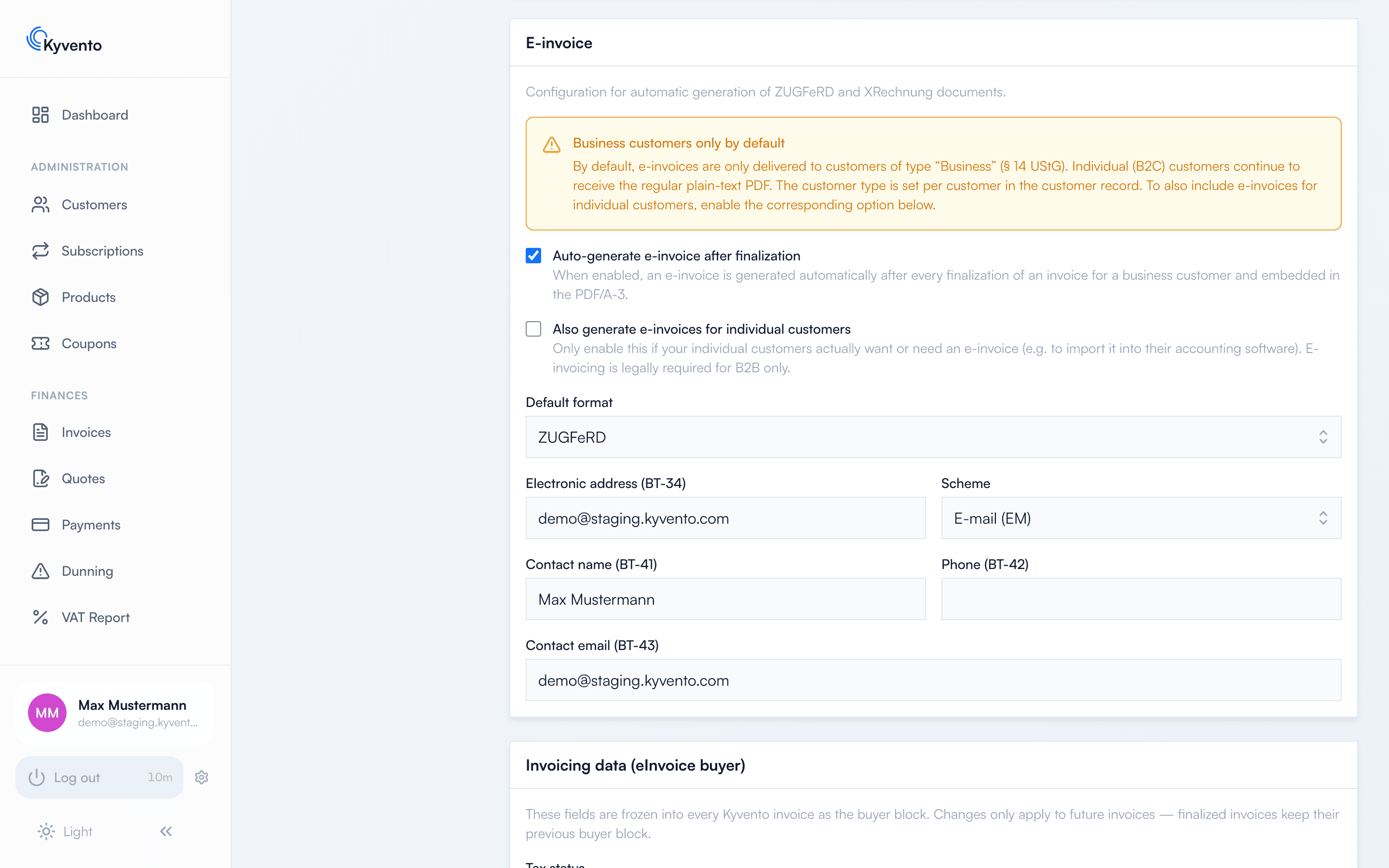
Under Settings → Account, section "E-invoice", you switch on automatic generation after every finalisation and choose the "Default format". Without a format selected, automatic dispatch stays off.
Two points that regularly surprise people:
- The e-invoice only goes to business customers. Individual customers keep receiving the regular PDF – e-invoicing is legally required for B2B only. If you want to generate it for individual customers too, there is a separate switch for that.
- What decides this is the customer type in the customer record, not whether a VAT ID is on file.
The same section holds the sender details that an XRechnung additionally requires: your electronic address including its scheme, plus contact name, phone and contact email. For ZUGFeRD they are not mandatory.
Using the readiness check
Once e-invoicing is enabled, Kyvento continuously checks in the same section whether your company details are sufficient for compliant documents, and lists every missing field individually – before the first invoice exists. What is checked is your seller identity: company name, address and at least one tax number; with XRechnung as the default format, the contact details above are added.
The check uses the same rule set as the generation itself: what counts as complete here will not be rejected when generating. What is not checked is anything tied to the individual customer – see the next section.
Details on the customer
For invoices to public-sector customers you store the Leitweg-ID on the customer; Kyvento validates its format. You get the ID from your customer, not from an authority – if it is missing or its check digit is wrong, their invoice portal rejects the document. Next to it sits the recipient's electronic address with its scheme: it is not necessarily the address you email the PDF to – larger recipients run a dedicated invoice inbox.
Generating a single e-invoice
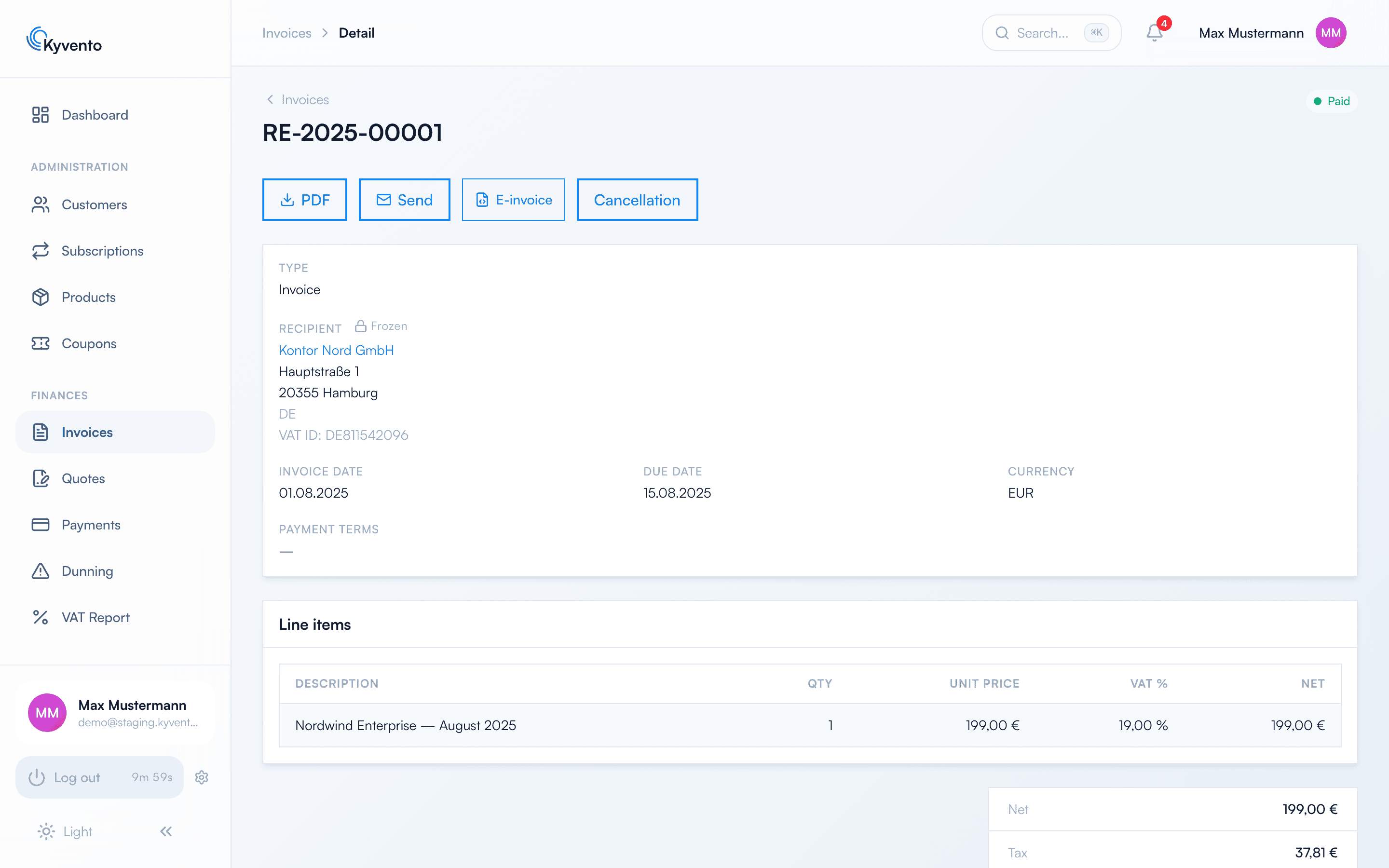
On the invoice detail page, the "E-invoice" button opens a dialog to pick the format. Kyvento creates a permanently stored file secured with a checksum; afterwards "Download e-invoice" appears. There is no XML download without generating it first.
Good to know
- When sending by email, Kyvento attaches the invoice PDF. The separate e-invoice file is not sent along – it is meant for the manual route, for example to import it into a customer's accounting software.
- Generated e-invoice files are secured with a checksum and archived in an audit-proof way – see GoBD-compliant archiving.
- An e-invoice can no longer be generated once a customer has been anonymised. If one is still pending for a document, generate it beforehand – afterwards it is permanently impossible.
Next steps
- Dispatch routes and attachments in detail – see Sending invoices by email
- Maintain company data and VAT ID completely – see Maintaining company and tax information