Changing or cancelling your Kyvento plan
Overview
The "Your plan" card under "Account" → "Billing" shows the current status of your Kyvento contract — "Active", "Trial period", "Paused", "Past due" or "Cancelled" — and offers the related actions. Plan changes, cancellation and payment methods are available to owners and administrators only.
Changing your plan
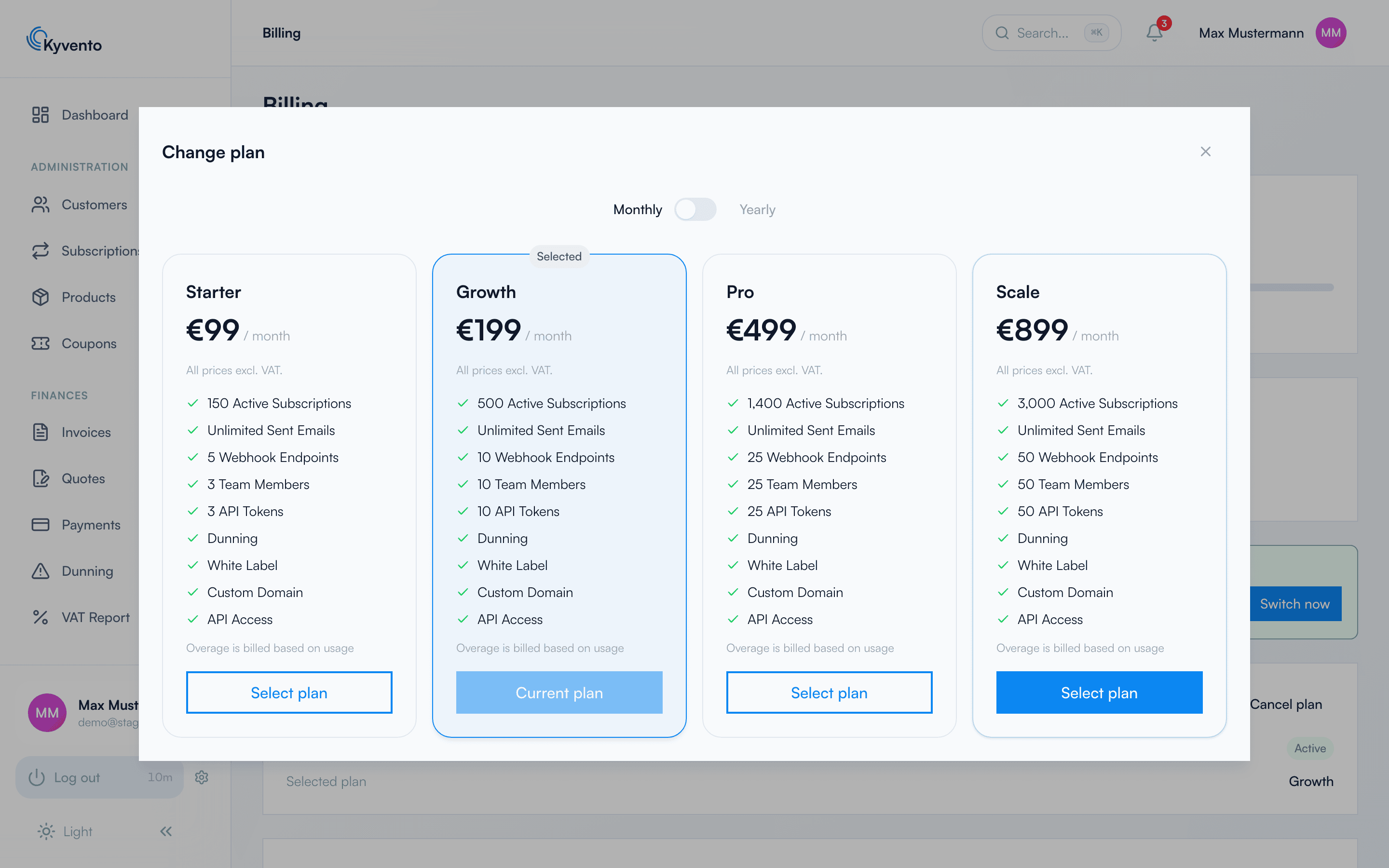
"Change plan" opens the plan selection (monthly or yearly). The following applies:
- An upgrade takes effect immediately and is charged pro rata at once.
- A downgrade applies only at the end of the current billing period.
- You confirm both in a preview dialog that shows the costs due in advance.
For a scheduled downgrade you can use "Revoke switch" to undo the change and keep your current plan — here too, a preview dialog first shows the costs that would then be due.
Everywhere you book a plan – plan selection, upgrade preview and the setup assistant – the cancellation rule for your billing interval is spelled out alongside: with monthly payment the renewal for one further month and the ability to cancel effective at the end of the billing month, with annual payment the 12-month term. For annual payment the saving compared with monthly payment is stated as well. If that text cannot be loaded for once, the order button stays disabled – an order without stated terms is deliberately not concluded.
At those same points, the terms and conditions, the data processing agreement and the privacy policy are available as links, so you can read and save the documents before submitting – not only beforehand at registration and afterwards in the confirmation email.
Cancelling your plan
After "Cancel plan" your plan continues until the end of the current billing period. The dialog states the exact effective date. While the cancellation has not yet taken effect, you can withdraw it via "Revoke cancellation" — the plan is reactivated and the "active until" date is removed.
After the contract ends: 60 days for your data export
The contract ends on the effective date – your access does not end on the same day. For 60 days afterwards your account remains reachable so that you can export your content. This period is promised by the terms and conditions (clause 3 (5)), and the application states it in several places:
- The cancellation confirmation names the end of the export period alongside the effective date.
- The plan card shows the row "Data export available until".
- You can still sign in; the application then takes you straight to the export page, which also displays the deadline.
During this period the account data export is available, but not the rest of the feature set. Other areas – billing included – respond with a corresponding notice without signing you out: you stay logged in and can reach your export.
Once the deadline has passed, the account is deleted automatically; a daily run hands expired accounts to the regular two-stage deletion process. So download your export in good time. An account blocked by Kyvento – on suspicion of abuse, for instance – is not granted an export period; contact support in that case.
First booking from the trial
If you choose a plan during the trial via "Choose a plan" under "Account" → "Billing", the trial ends with this order, and the amount is charged right away via your stored payment method. The confirmation dialog points this out explicitly: "Your trial ends with this order." You complete the order via the button explicitly marked as carrying an obligation to pay, "Confirm paid upgrade".
Payment by SEPA direct debit: A SEPA payment is not confirmed instantly. During that time you see the notice "Your payment is being processed"; your plan is activated only once the payment is confirmed. With a credit card this usually happens immediately (credit card and SEPA direct debit are the payment methods available for the Kyvento plan). Without a stored payment method, the add dialog opens first before booking.
What you receive after ordering
Kyvento confirms every order with an obligation to pay by email. The confirmation names the plan you booked, the billing interval and the terms in the same wording you saw when ordering, and carries the terms and conditions and the data processing agreement as PDF attachments – each in the version your account agreed to. That leaves you holding the contract documents permanently rather than as a link. The privacy policy is information only and is therefore deliberately linked rather than attached.
In parallel, Kyvento records an immutable order record for every order: billing interval, the term wording displayed, the document versions and the prices. It is never overwritten – a later change of plan or billing interval writes its own entry. The record serves as evidence for you and for us; personal metadata is anonymised after three years and the record itself is deleted once the statutory retention period expires.
Confirmation checkboxes for terms and privacy are no longer part of the order step: the conclusion of the contract is documented by the button explicitly marked as carrying an obligation to pay, together with the order record. Nor will you find a withdrawal notice here – the Kyvento offering is addressed exclusively to businesses.
If the trial ends without a booking: the grace period
If the trial expires without a booked plan, Kyvento does not block your account right away. A 3-day grace period begins during which you keep access and can book a plan at any time. During this period you receive two reminder emails:
- At the start of the grace period: "Last chance" — with the date until which you can secure access by booking a plan.
- 24 hours before expiry: a final warning that access will be restricted the next day.
If the grace period also passes without a booking, your account is paused: access is restricted, but your data is fully preserved. As soon as you book and pay for a plan, the account is reactivated automatically. If you need more time, contact our support team — your trial can be extended.
Next steps
- Understand plan, quota and overage — see Your Kyvento plan and usage
- Add or change a payment method — see Payment methods and your Kyvento invoices