Managing cancellations
Overview
Cancellations are part of the subscription business. Kyvento supports both paths – cancellation by your team and self-cancellation by the customer in the portal – and handles cleanly what happens to the term and any open invoices.
Cancelling a subscription (backend)
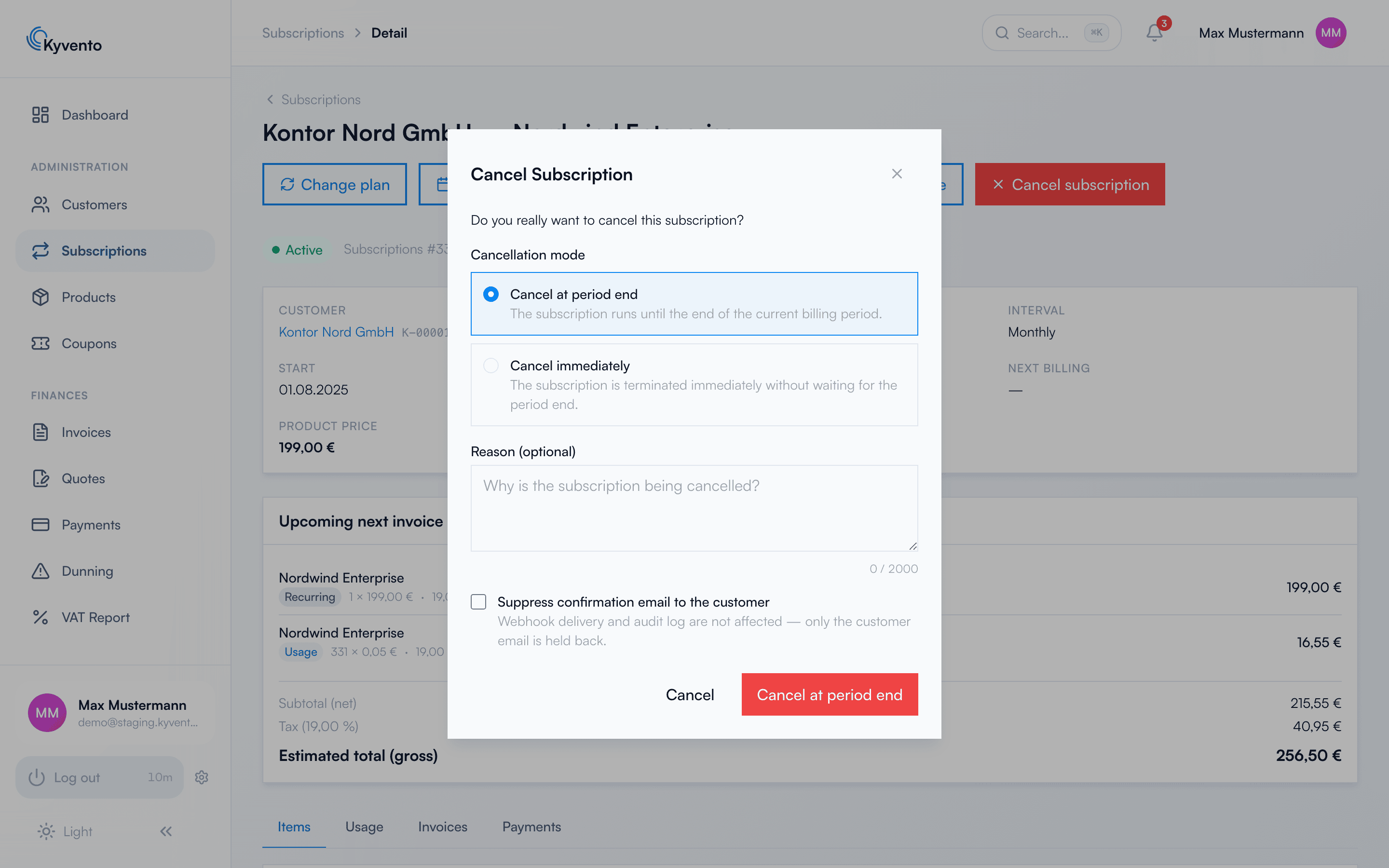
Open the subscription and click "Cancel subscription". In the dialog, you select the cancellation mode:
- "Cancel at the end of the period" (default) – the subscription continues until the end of the paid billing period and then ends automatically.
- "End immediately" – the subscription ends instantly, without waiting for the end of the period.
Optionally, you record a reason (for your own analysis) and suppress the confirmation email to the customer.
What happens to open invoices
Existing open invoices are unaffected by the cancellation – they remain due and, if necessary, go through the dunning process. A pro rata refund for unused time is not issued automatically for an immediate cancellation; create a credit note for this if needed.
Self-cancellation in the customer portal
Logged-in customers cancel their subscription in the customer portal themselves — for consumer-protection reasons always at the end of the period, respecting the notice period stored on the product.
Whether a subscription can be cancelled in the portal is decided by the product: the switch "Cancellable in the customer portal" in the product form is on by default. Switch it off and the cancel button for that subscription disappears from the portal. Whether newly created products should be cancellable is governed by the account setting "Create new products as cancellable in the customer portal" — also on by default.
For a subscription that is not cancellable in the portal, the portal shows the text from the field "How to cancel a subscription that is not cancellable in the portal" (Settings → Customer portal → General) instead, under the heading "Cancelling this contract". Describe there in your own words how cancellation works at your company. If you leave the field empty, nothing at all appears on a non-cancellable subscription — Kyvento does not invent a cancellation route you have not stated.
Cancellation without login (§ 312k BGB)
Besides the portal, Kyvento can provide a public cancellation page that your customers reach without signing in — linked in the footer of your checkout and portal pages. Customers identify themselves there with their email address and a customer or invoice number; the confirmation goes to the address stored in the contract and contains a link to withdraw the cancellation.
The page is switched off by default — you enable it deliberately under Settings → Customer portal → General ("Offer public cancellation page"). Whether § 312k BGB applies to your business — for purely commercial customers or customers outside Germany, for instance — is your decision; Kyvento provides the tool and does not check this.
The switch does not affect the cancel button in the logged-in portal — as described above, that one depends on the product. The two routes are controlled separately.
If you have consumers as customers: consider both routes together
Because the two switches are independent, the cancellation route can be closed off entirely by accident: if a product is set to non-cancellable, the "how to cancel" field is empty and the public page is off, a consumer will find no way to cancel anywhere in your interface. Check these three places together before you change any one of the switches.
Unmatched cancellations
Not every declaration received via the public page can be matched to a contract automatically — for example when the customer gives a different email address than the one stored on the subscription. Kyvento collects these cases under "Unmatched cancellations" (sidebar, under "Subscriptions"), with the matching states "Cancelled automatically", "Not matched" and "Ambiguous". You tick off resolved cases via "Mark as processed".
These declarations have been legally received and must be processed. Kyvento notifies you when an unmatched case arrives but does not monitor any deadline: the notice period runs from receipt — that is, from the moment it appears on this list, not from when you tick it off. Check the list regularly.
Withdrawal is not the same as cancellation
Within the statutory withdrawal period (§ 356a BGB) consumers can not only cancel the contract but withdraw from it — the contract then counts as never concluded. Kyvento treats this as its own operation: during the period a withdrawal button appears in the customer portal; the backend has no withdrawal action of its own. There you see the result on the subscription: if suspension on withdrawal is enabled on the product, the subscription carries the status badge "Suspended (Withdrawal)". You can also end the right of withdrawal early via "Mark as used" (§ 356 BGB).
What a withdrawal triggers is configured on the product: whether the contract ends, whether the refund is full or pro rata, whether it is issued automatically, and whether the subscription is suspended immediately. Setting the withdrawal period to 0 days disables withdrawal for that product — common for pure B2B offerings.
On notice periods: Kyvento warns, but does not block
You can set any notice period on a product. If you choose more than 30 days, Kyvento points out that such a period is contestable towards consumers under § 309 no. 9 b BGB — it is still saved, and the warning is recorded. The decision stays with you: for different B2B terms, it is best to create a separate product.
Undoing a cancellation
As long as the effective date is in the future, a cancellation can be reversed – in the backend via "Reactivate", in the customer portal via "Withdraw cancellation". An immediate cancellation is final.
Next steps
- Just pause temporarily instead of cancelling – see Pausing or freezing subscriptions
- Tidy up cancelled subscriptions – see Archiving cancelled subscriptions